4.1 Operational templates
STORE IN VAR:
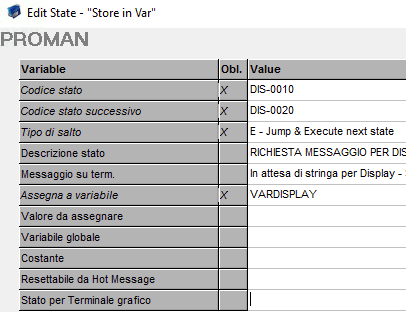
Template that allows you to create/store a value in a variable.
- Status code: Indicates automa state code on which the template you are inserting.
- Next status code: Is the next state that will be run by automa.
- Type of jump: Is the mode by which the automa switches from the state that we are entering to the next state (if it is type 'E' executes the current state and then goes immediately to the next state; if it is type 'W' executes the current state and then you wait for an input before you switch to the next state).
- Status description: Is a description to indicate the operation related to the current state.
- Terminal message: Is the string that will display on the terminal display. This is the syntax:
MESSAGE; TYPE MESSAGE [0,1,2,3];MODAL [true,false]
Example: Hello World;0;0;false
6. Assign to variable: Enter the name of the variable where the data will be stored.
7. Value to assign: Enter a value to assign at variable.
8. Global variable: Yes or no.
9. Costant: Yes or no.
10. Resettabile da Hot Message: yes or no.
SPLIT STRING:
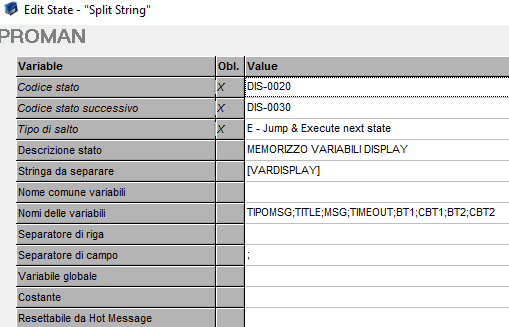
Template that allows us to separate the values of a string and possibly insert them into different variables.
- String to split: Enter the string to be separated, enclosed in brackets [].
- Common name variables: Indicates the variable prefix in which the rows found in the string are saved
- Variables Name: Variables name.
- Line Separator: Line Separator inside the string.
- Field separator: Field separator inside the string.
- Variabile globale: yes or no.
- Costante: yes or no.
- Resettabile da Hot Message: yes or no.
SEND COMMAND:
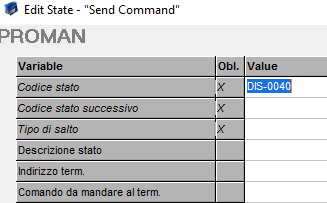
Template sends command to the terminal.
- Terminal Address: Terminal address.
- Sends command to the terminal.
IF:
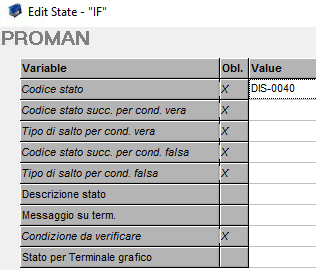
Template per valutare una condizione.
- Status code: Indicates automa state code on which the template you are inserting.
- Next status code for true condition: Is the next state that will be run by the automa if test on the format has been successful.
- Type of jump for true condition: Is the mode by which the automa switches from the state we are entering to the next state if the test on the format has been successful(if it is type 'E' executes the current state and then goes immediately to the next state; if it is type 'W' executes the current state and then you wait for an input before you switch to the next state).
- Next status code for false condition: Is the next state that will be run by the automa if test on the format has failed.
- Type of jump for false condition: Is the mode by which the automa switches from the state we are entering to the next state if the test on the format has failed((if it is type 'E' executes the current state and then goes immediately to the next state; if it is type 'W' executes the current state and then you wait for an input before you switch to the next state).
- Condition to verify: The condition to be checked in the IF,for example ['CAPACITY'] > 0
Created with the Personal Edition of HelpNDoc: Easily create EPub books